Using Refocus Mode on a Dino-Lite in Tight Spaces or Hands-Free Situations
Some inspections go exactly as planned. The surface is accessible, both hands are free, and adjusting focus is a matter of a quick turn. But many real-world situations aren’t like that.
Imagine pressing a Dino-Lite against the interior wall of a narrow cavity — a tight space inside a machine, a hard-to-reach panel, or the ancient painted surface of an archaeological site. Your arm is extended, your position is locked in, and moving even slightly could mean losing the exact spot you need to capture. Reaching back to adjust focus isn’t just inconvenient — it’s not really an option.
This is the problem Refocus Mode was built to solve.
What Is Refocus Mode?
Refocus Mode is a feature available on Dino-Lite EDOF (Extended Depth of Field) models that moves focus control out of your hands and into the software. Instead of physically adjusting the microscope, the focus is fine-tuned directly through DinoCapture — Dino-Lite’s companion software — on a connected laptop or display.
One important distinction: Refocus Mode is not a full autofocus system. It doesn’t automatically find or lock onto a subject. Instead, it gives you software-based control to manually adjust focus to a point of interest within the depth range that your EDOF model supports. Think of it as putting a depth-range refocus control on screen rather than on the device — you’re still making the call, just from a more convenient place.
This means that whether you’re the only person in the room or working alongside a colleague at a laptop, focus can be readjusted without anyone touching the microscope. The Dino-Lite stays exactly where it needs to be. The refocus gets handled from the screen.
Where Refocus Mode Makes a Difference
Tight or Confined Spaces
When the microscope has to go somewhere hands can’t comfortably follow — inside electrical cabinets, along production equipment, into narrow cavities — software-based focus control removes one of the biggest friction points.
- Automotive and mechanical inspections
- Electrical panel and wiring inspections
- Production equipment and quality control
- Any environment where repositioning disrupts the shot
When Both Hands Are Occupied
Sometimes the challenge isn’t the space — it’s that the operator is already doing something else. Stabilizing the microscope, holding a component in place, or managing cables can all leave no hand free for focus adjustments.
- Holding or positioning delicate components
- Steadying the microscope in an awkward position
- Performing simultaneous adjustments during inspection
Team-Based Inspections
Refocus Mode also enables an effective two-person workflow that many users haven’t considered. One person positions the Dino-Lite; a second person watches the live feed on the laptop and handles refocus adjustments in DinoCapture. Both users working together could capture sharper images more efficiently than alone.
This approach has come up in feedback from customers who found solo operation difficult — particularly when working with an arm extended into an awkward position. The two-person solution works, but it wasn’t widely known. Refocus Mode makes it intentional.
Mounted Setups
One of the most practical and underappreciated applications of Refocus Mode is when the Dino-Lite is fixed in place on a stand, arm, or mount. In this configuration, a single operator can position the microscope, step back to the screen, and adjust focus through DinoCapture 3.0 — no assistant needed, no hand on the device.
This is particularly useful in repetitive inspection workflows, controlled lab environments, or any setup where the microscope is secured and the operator wants to work from a display rather than from the microscope itself.
A Real-World Example: Archaeological Site Inspection
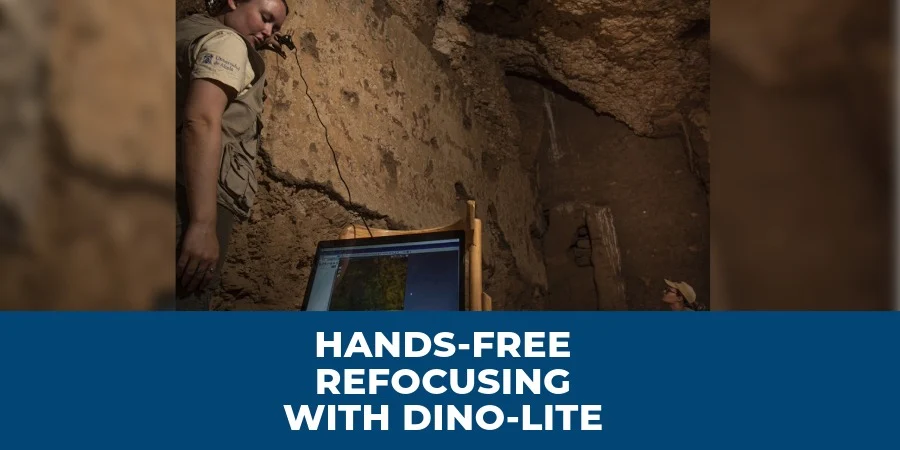
One application that illustrates this workflow particularly well is archaeological fieldwork — and it’s not hypothetical. Conservators working with the Middle Kingdom Theban Project (MKTP) at the tomb of Dagi (TT 103) in Egypt used a Dino-Lite to conduct technical analysis of ancient paintings preserved on the tomb walls, as well as individual fragments. The examination required close imaging of preparation layers and pigments — including the mixtures of different pigments used by ancient craftspeople to achieve specific colors — across surfaces that are fragile, irreplaceable, and in extremely confined conditions.
This is exactly the kind of situation Refocus Mode is designed for: a narrow space, a surface that cannot be disturbed, and the need for precise, repeatable focus adjustments without shifting the microscope’s position. Whether one person is operating the Dino-Lite while another adjusts focus from a connected laptop, or the device is mounted and the operator works from the screen, the workflow stays stable and the surface stays undisturbed.

Photo credit: Middle Kingdom Theban Project (MKTP)
Key benefits at a glance:
- Works for solo operators with a mounted microscope or two-person teams in the field
- Reduces unnecessary movement during sensitive inspections
- Maintains stable microscope positioning throughout
- Minimizes accidental shifts while focus is being adjusted
- Speeds up imaging in awkward or confined environments
Tips for Best Results
Understand the Focus Range
Refocus Mode adjusts focus within your EDOF model’s supported depth range — it is not a full autofocus system and won’t hunt for a subject on its own. For best results, get the microscope reasonably close to focus before activating Refocus Mode, then fine-tune from the software.
Stabilize the Microscope
Use stands, articulating arms, or holders whenever the inspection allows. This is especially important in mounted single-operator setups, where the microscope needs to stay put while you work from the screen.
Maintain Consistent Working Distance
Small positional shifts can affect where you land within the focus range. The operator should hold position — or the mount should stay fixed — while focus is being adjusted from the software.
Coordinate Clearly in Team Setups
Establish simple signals between the operator and assistant so both know when the microscope is settled and when focus adjustment should happen. A quick rhythm here makes the workflow noticeably faster.
Adjust Lighting as Needed
Use the built-in FLC (Flexible LED Control) or external lighting to ensure the surface is well-lit before focusing. Consistent lighting makes software focus adjustments more accurate and reduces back-and-forth.
Refocus Mode Is Just One Part of What EDOF Models Offer
Dino-Lite EDOF models are built around Extended Depth of Field — an automatic focus stacking feature that combines multiple focal planes into a single sharp image, giving you clarity across surfaces that would otherwise be too deep or uneven for a single focal point to capture.
Refocus Mode is one of several additional software-based tools that come with these models in DinoCapture:
- One-Touch Autofocus — Automatically focuses and refocuses on your subject as long as it stays within the focal range.
- DPQ (Depth Acquisition) — Captures depth information from the focus shift between two focal planes during live imaging, providing measurable surface depth data on compatible models.
Conclusion
Refocus Mode addresses something straightforward: the person holding or positioning the microscope often can’t be the person adjusting focus. Whether you’re a solo operator working from a mounted setup, stretched into a confined space with both hands occupied, or part of a two-person team in the field, having focus control on the screen changes what’s possible.
It’s worth being clear about what it is: a user enabled refocus adjustment tool built into DinoCapture, giving you precise control within your EDOF model’s focus range. It’s not autofocus — you stay in control, just from a better vantage point.
If your inspections involve hard-to-reach surfaces, mounted setups, or collaborative fieldwork, it’s worth exploring whether an EDOF Dino-Lite with Refocus Mode fits your workflow.
Contact our team to find the right EDOF model for your application, or schedule a free demo to explore compatible microscopes and DinoCapture software for Windows