Note: The WF-20 or WF-10 Wi-Fi streamer is designed to work with the DinoConnect App for iOS and Android. The WF-20, WF-10 also works with DinoCapture 2.0 version 1.5.28 or newer on Windows computers with Wi-Fi connection.
Connect the WF-20 / WF-10 to DinoCapture 2.0
| Instruction | Screenshot |
|---|---|
| 1 Power on the WF-20 / WF-10 WiFi adapter and connect a compatible Dino-Lite microscope | 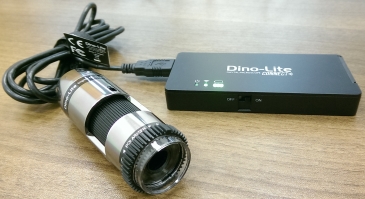 |
| 2 From the PC, connect to the Wi-Fi access point (SSID) created by the WF-20 / WF-10 Default name: Dino-Lite WiFi Streamer Default Password: 12345678 | 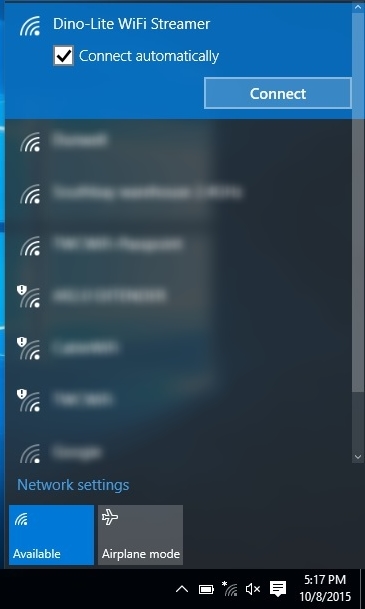 |
| 3 Open DinoCapture 2.0 version 1.5.28 or newer. |
Connect the WF-20 / WF-10 to a PC via web browser
1. Power on the WF-20 / WF-10 WiFi adapter and connect a compatible Dino-Lite microscope
2. From your PC, connect to the Wi-Fi access point (SSID) created by the WF-20 / WF-10:
- Default name: Dino-Lite WiFi Streamer
- Default Password: 12345678
3. Open a web browser on your PC and browse the following URL: http://10.10.10.254:8080

Connect to the WF-20 / WF-10 using a mobile app
The adapter can also be connected to from an Android or iOS mobile device using one of the mobile apps below.